What is the next delivery? Where is the current version of the document? What is the status of project charges? These questions are part of the relationship between a company and the people developing its digital solutions.
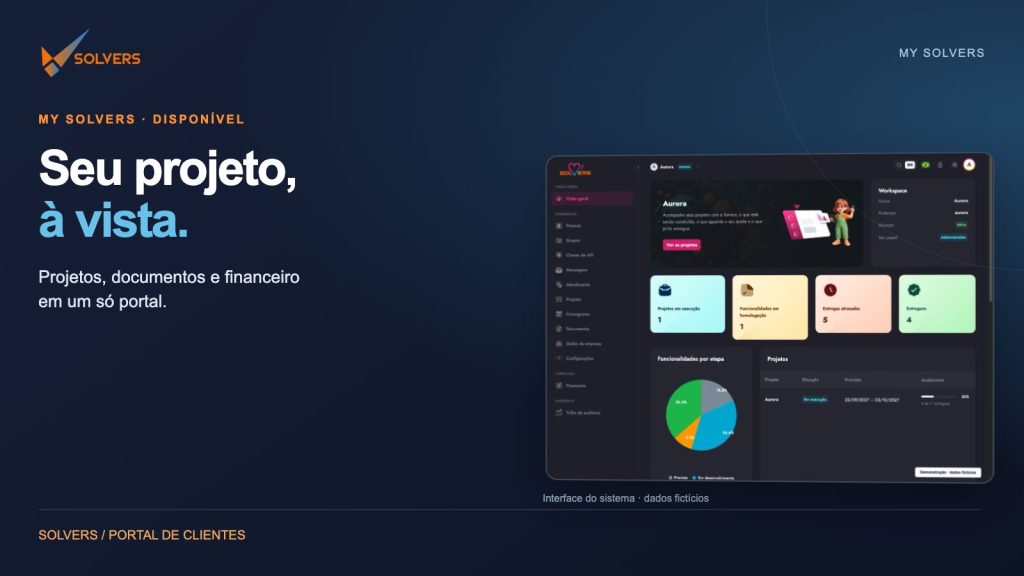
My Solvers is available to bring this information together in a portal for your relationship with Solvers. Its purpose is to bring project information closer to the people who need it and keep conversations connected to the work.
An overview to get started
When you enter the portal, the overview presents progress and delivery information. It is a starting point for understanding the overall picture before exploring a project’s details.
An indicator helps locate a topic; the details help interpret it. For that reason, it is useful to combine the summary with feature stages, dates, and related conversations. The portal organizes this information to support follow-up with the team.
Projects: from scope to delivery
In the projects area, features are organized into stages such as planned, in development, in acceptance testing, and delivered. This helps show what is planned, what is being built, and what has reached validation.
Consider an illustrative example: a company is developing a customer service portal. Request lookup may be in development while portal access has already been delivered. Looking at each feature makes it possible to discuss the work more specifically than simply asking whether “the system is ready.”
Acceptance testing deserves attention in this process. It indicates a validation stage in which conversation between the client and the team helps check the expected behavior. Comments associated with the feature keep the discussion in context.
Schedule: dates have context, too
The schedule lets you view the calendar and filter by project. This makes it easier to find the execution window and identify planned, completed, or overdue deliveries against the displayed plan.
A date is a reference for a conversation, not a complete explanation. When there is a question about a delivery, consult the details and discuss it with the team. The portal makes progress visible; partnership remains essential for decisions.
Documents: find the material and check the version
Proposals, reference files, and project documents need to be accessible during the work. My Solvers brings together an area for documents and project files, including version and last-change information.
Before reviewing material or using it in a meeting, check the version identifier. This helps keep the conversation focused on the same document. In the customer service portal example, the process analysis can guide discussion of a feature, while the proposal records the agreed commercial context.
Names and documents shown in the images in this article are fictional and are used only to demonstrate the interface.
Financial information: follow project charges
In the financial area, you can view amounts, due dates, and payment information. Status filters help distinguish open, paid, overdue, or under-review charges.
This information provides context for specific questions: which charge are we discussing? What due date is shown? Is the status under review? Once the information is identified, the conversation with Solvers can be more specific.
Viewing information in the portal does not change the commercial terms agreed for each project. Amounts, down payments, and installments follow the proposal and contract.
Support and people in the same environment
My Solvers also brings together messages and support matters. For questions related to a feature, associated comments help preserve the context of the conversation.
People and permission groups organize participation in the workspace. The team can guide access according to each client’s context and the resources available to each person.
A simple follow-up routine
A project meeting can start with the overview, move on to features in progress, and check the schedule. If material needs review, the documents area helps locate the file. Specific questions can be discussed alongside the feature or through support.
There is no need to visit every area every time. The goal is to find the information that matters at that moment: a delivery, a document, a charge, or a conversation.
Technology with a personal connection
My Solvers is part of how Solvers follows its work with clients. The portal organizes information; the team remains available to discuss scope, decisions, and next steps.
Would you like to learn about My Solvers or receive access guidance? Contact us by WhatsApp at +55 11 97087-9021 or email contato@solvers.com.br.
Your project in view. Your partnership with Solvers close at hand.